What Is AWS ECS and How It Works (Beginner Guide)
A plain-English guide to Amazon ECS: what it is, how it differs from EC2, what ECR does, when to use it, and the full container deployment flow.
Amazon ECS runs containerized applications and helps keep the required number of copies available. You describe the application, choose its compute and networking, and let ECS schedule the work.
For example, suppose a small shop has an API that handles orders. You package the API as a container image. An ECS service can maintain two running copies and replace a failed task. You still configure permissions, health checks, network access, and scaling rules.
This guide explains those pieces before you deploy anything. It is an architecture introduction, not a complete infrastructure provisioning script.
What is AWS ECS?
Amazon Elastic Container Service is a managed container orchestrator. An orchestrator decides where containers run and coordinates their lifecycle. AWS operates the ECS control plane, so you do not install or patch that scheduler yourself.
An image is the packaged application. A container is a running instance of an image. Containers share their host’s kernel; an image is not a complete virtual machine. Packaging helps make environments consistent, but architecture, permissions, and configuration still matter.
ECS can use Fargate, EC2 instances you manage, or ECS Managed Instances. ECS Anywhere also supports registered external machines. It is therefore inaccurate to say ECS workloads can only run inside AWS. See the official ECS overview.
ECS vs EC2 vs Fargate vs ECR
These names describe different jobs in the same deployment.
| Name | Job |
|---|---|
| ECS | Schedules and manages container tasks. |
| EC2 | Provides virtual machines that can supply compute for ECS. |
| Fargate | Supplies compute for tasks without you managing the underlying servers. |
| ECR | Stores container images for later download. |
For our shop API, ECR can hold the image, ECS can manage two tasks, and Fargate can provide their CPU and memory. Choosing ECS does not mean you must personally create EC2 instances.
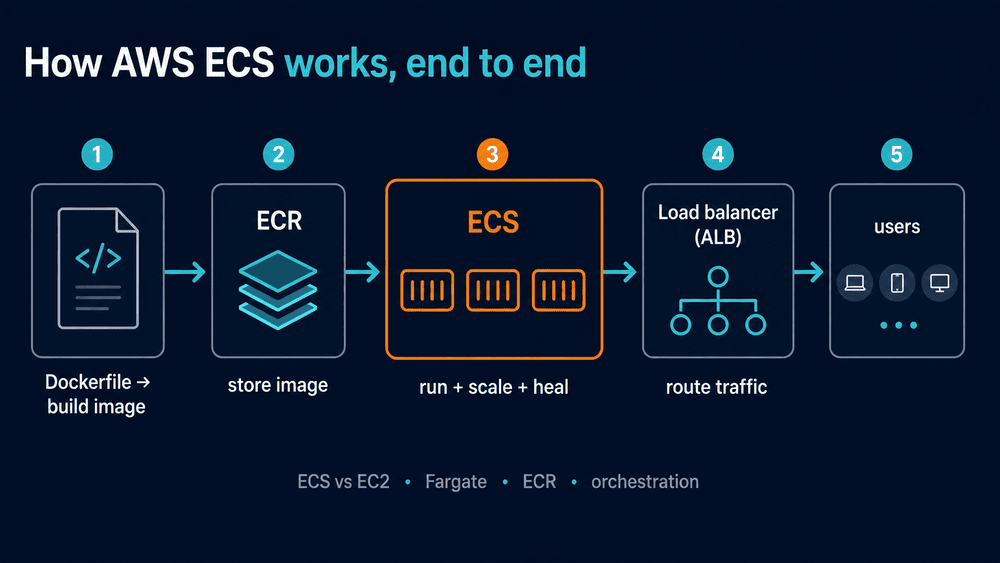
The diagram shows a common design, not a list of mandatory services. For instance, a background worker might not need a public load balancer.
Task definitions, tasks, services, and clusters
Task definition: the instructions
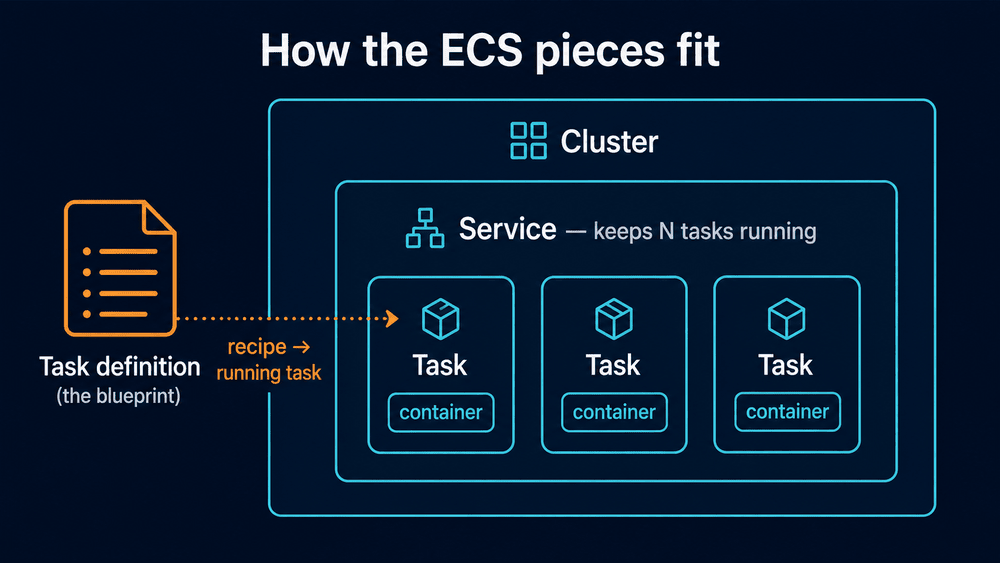
A task definition records the image, CPU and memory settings, container ports, logging configuration, and relevant permissions. It can describe more than one container.
For the shop API, the definition might name an image tagged orders-api:v1, specify port 3000, and send application logs to CloudWatch. Registering a definition alone does not start the application.
Task: one running instance
A task is an instance of a task definition. Two API tasks mean two running copies of that defined application.
A standalone task is useful for work that finishes, such as importing a file. It is not automatically managed by a service. Separately, a configured container restart policy can restart an eligible exited container within a task. That differs from replacing a stopped task.
Service: maintain the desired count
A service maintains a requested number of tasks. If a task stops or becomes unhealthy, the scheduler works to replace it. Replacement still depends on available capacity and a valid configuration; repeatedly failing tasks need investigation.
For our API, start with a desired count of two. Configure load balancing if clients need traffic distributed between those tasks. A service does not make a broken image or incorrect health check work. See ECS service behavior.
Cluster: group the workload
A cluster groups ECS tasks, services, and applicable capacity. A name such as shop-production helps organize them. A cluster name alone is not a complete security boundary: IAM, network settings, and workload isolation still need configuration.
Which compute option should you choose?
Fargate is a practical starting point when your workload fits its supported CPU, memory, operating system, and architecture options. You configure task resources while AWS manages the servers beneath them.
Self-managed EC2 capacity gives you control over instances. Your team takes on the relevant instance management and capacity work. Compare it when hardware requirements, utilization, or operational needs justify that responsibility.
ECS Managed Instances lets AWS manage provisioning and maintenance of EC2 capacity for ECS. It supports capabilities such as specialized instance types. It has a management fee in addition to EC2 charges. See Managed Instances.
Do not choose purely from a slogan such as “serverless is always cheaper.” Compare an actual workload: requested resources, traffic pattern, idle time, availability requirements, and team maintenance effort.
Is ECR required for ECS?
No. ECS needs access to an image, but ECR is not the only registry it can use. Other registries can work with the appropriate image reference, authentication, and network access. AWS documents private registry authentication.
ECR is convenient when you already use AWS IAM and want an AWS-managed registry. It offers both private and public registry options. Our ECR beginner guide explains image storage separately from running containers.
What the deployment flow looks like
For the shop API, work through these stages:
- Build and test an image. Make sure the app starts, listens on the intended interface and port, and serves a health endpoint.
- Push it to a registry. Use a versioned tag or digest so you can identify the release.
- Register a task definition. Set resources, logs, ports, and IAM roles.
- Choose a cluster and compute. Confirm there is suitable capacity or a supported Fargate configuration.
- Configure networking. Tasks must reach the services they need, including their image registry and logging destination.
- Create a service. Set the desired count and health checks. Attach a load balancer where required.
- Verify it. Check service events, running tasks, logs, and the public or internal endpoint before sending real traffic.
A private subnet needs appropriate routes or endpoints to reach dependencies. Putting a task in a VPC does not automatically give it internet access. Security groups must allow the required traffic. See task networking.
For a guided web-service deployment path, continue with ECS Express Mode.
The two IAM roles
The task execution role grants permissions used to start and support the task, such as relevant ECR pulls and CloudWatch logging. The task role supplies permissions to the application inside the container, such as access to an S3 bucket.
An image-pull failure can involve permissions, but it can also involve an incorrect image name, network access, or registry authentication. Do not assume every failure is an IAM problem. Refer to the execution role documentation and task role documentation.
Our ECS image-pull troubleshooting guide helps separate those causes.
Does ECS automatically scale and deploy without downtime?
Service Auto Scaling can adjust task counts when you configure it. Selecting ECS alone does not create the right scaling policy for your traffic.
Likewise, a rolling update can keep old tasks available while replacements start, but zero downtime is not unconditional. Capacity, health checks, deployment settings, application shutdown, and database compatibility affect the result.
For the shop API, test an update while requests are flowing. Confirm new tasks become healthy and old requests finish cleanly. Our deployment strategies guide compares rollout approaches.
Is AWS ECS free?
There is no additional ECS charge for standard EC2 and Fargate launch types, but the underlying resources are billed. Managed Instances adds a management fee; ECS Anywhere has its own pricing.
Include compute, load balancing, storage, logs, networking, and image storage in your estimate. A stopped task does not necessarily remove a load balancer or NAT gateway. Use the current ECS pricing page instead of assuming orchestration means the whole deployment is free.
Common questions
Is ECS the same as Kubernetes?
No. Both orchestrate containers, but their APIs, configuration, and ecosystems differ. Choose based on the platform your team can operate and the integrations you need.
Can a service run without a load balancer?
Yes. A queue worker can run as a service without accepting public HTTP requests. The service still maintains its desired task count.
What should I check when a task keeps stopping?
Start with the service events and task’s stopped reason. Then inspect the container exit code, application logs, resource settings, permissions, and network access. Change the setting supported by that evidence rather than repeatedly restarting the same failing configuration.
Where should a beginner start?
Use one small application and understand its image, task definition, service, and network path. Keep a cleanup list for anything you create. Once that flow works, add scaling and release automation deliberately. Browse the AWS guides for the next steps.